Table of Contents
ToggleThe iRobot Roomba 675 has been on the market for several years, but it remains one of the most popular entry-level robot vacuums for good reason. It’s positioned as a no-frills, budget-friendly option that handles daily maintenance cleaning without the learning curve, or price tag, of premium models. For homeowners tired of dragging out the upright vacuum every other day, the 675 offers a simple way to keep floors tidy between deeper cleaning sessions. But in 2026, with dozens of newer competitors flooding the market, does this older model still hold up? This review breaks down performance, features, and real-world usability to help you decide if it’s the right fit for your home.
Key Takeaways
- The iRobot Roomba 675 remains an affordable entry-level robot vacuum at $200–$275, ideal for small homes with mostly hard floors and low-pile carpets seeking simple, maintenance-focused cleaning.
- The Roomba 675 uses sensor-based navigation without smart mapping, so it can’t select specific rooms or create no-go zones without purchasing separate Virtual Wall accessories.
- Performance on the Roomba 675 is solid on hard floors and light carpets but struggles significantly on thick, high-pile rugs due to modest suction and limited brush agitation.
- Regular maintenance—including weekly brush cleaning, monthly sensor wiping, and filter replacement every 2 months—is essential to keep the Roomba 675 performing at its best.
- Newer competitors like the iRobot i3/i3+ and Eufy RoboVac 30C offer stronger suction, smart mapping, and better carpet performance at comparable or slightly higher price points, making them better choices if your budget allows for a $50–$100 increase.
What Makes the Roomba 675 Stand Out?
The Roomba 675 isn’t trying to be the smartest robot in the room. It’s designed as a straightforward, reliable cleaner that gets the job done without complicated setup or advanced mapping. That simplicity is both its strength and its limitation.
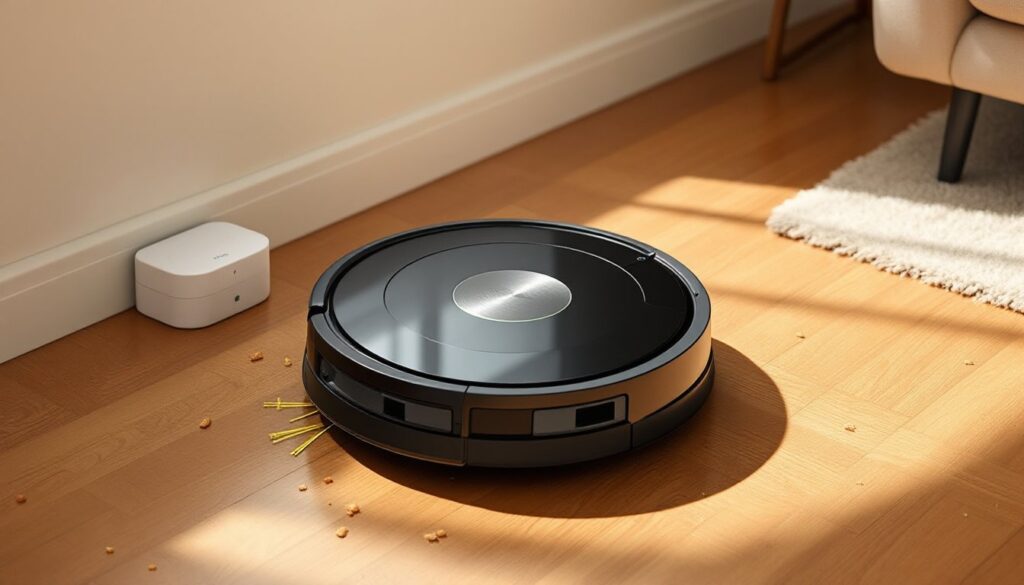
At its core, the 675 uses iRobot’s three-stage cleaning system: a side brush to sweep debris from edges and corners, dual multi-surface brushes (one bristle, one rubber) to agitate and lift dirt, and a vacuum motor to pull everything into the dustbin. It navigates using iAdapt 1.0, a sensor-based system that detects obstacles, drop-offs, and high-traffic areas. There’s no laser mapping or room-by-room navigation, this unit bumps, turns, and covers the floor in a semi-random pattern until the battery runs low.
The vacuum runs on a lithium-ion battery that provides roughly 90 minutes of runtime per charge, which is enough to cover about 600–800 square feet depending on floor type and clutter. When the battery gets low, it automatically returns to the Home Base charging dock. The dustbin holds 0.6 liters, which is standard for this class of robot vacuum but requires frequent emptying if you have pets or high foot traffic.
Key Features and Specifications
- Dimensions: 13.4 inches diameter, 3.6 inches tall
- Weight: 6.8 pounds
- Suction power: Not officially rated by iRobot, but estimated around 600 Pa (modest by 2026 standards)
- Dustbin capacity: 0.6 liters (manual emptying required)
- Battery: Lithium-ion, ~90-minute runtime
- Charging time: Approximately 2–3 hours
- Navigation: iAdapt 1.0 (sensor-based, non-mapping)
- Connectivity: Wi-Fi enabled, works with iRobot HOME app, Alexa, and Google Assistant
- Filtration: Standard AeroVac filter (not HEPA)
- Cliff detection: Yes
- Virtual wall compatible: Yes (sold separately)
The 675 doesn’t include advanced features like room mapping, no-go zones, or self-emptying bins. If those are priorities, you’ll need to step up to a higher-tier model. But for basic, daily maintenance cleaning, the feature set covers the essentials.
Performance on Different Floor Types
The Roomba 675 handles hardwood, tile, and low-pile carpet reasonably well, but struggles on anything plush or heavily textured. On hard floors, the dual brushes and side sweeper do a solid job picking up dust, crumbs, pet hair, and light debris. The brushes adjust automatically to maintain contact with the surface, and the vacuum moves smoothly across transitions between rooms.
On low-pile carpet and area rugs, performance is acceptable for everyday maintenance. It picks up surface-level dirt and hair, though it won’t deep-clean embedded grit the way a traditional upright with a beater bar would. The 675 lacks the stronger suction and carpet-boost modes found in newer models, so if you’re dealing with ground-in sand or heavy pet shedding, you’ll still need to break out the manual vacuum once a week.
Medium- to high-pile carpet is where the 675 shows its age. The brushes can bog down in thicker fibers, and suction isn’t strong enough to pull debris from deep in the pile. Testing by independent reviewers has consistently shown that the 675 underperforms on plush rugs compared to models with adjustable suction and more aggressive brush action.
Pet hair is a mixed bag. On hard floors and short carpet, the rubber extractors resist tangling better than traditional bristle brushes, and the vacuum picks up a decent amount of fur. But the small dustbin fills quickly, and without HEPA filtration, fine dander and allergens may recirculate. If you have multiple shedding pets, plan to empty the bin after every run and run the vacuum daily to keep up.
One practical note: the 675 doesn’t have a “spot clean” button on the unit itself, you’ll need to trigger spot cleaning from the app. It also lacks any kind of automatic carpet detection, so it won’t ramp up suction when it hits a rug.
Smart Home Integration and App Control
The Roomba 675 connects to the iRobot HOME app via Wi-Fi, and setup is straightforward: download the app, power on the vacuum, and follow the prompts to connect it to your 2.4 GHz network. (It won’t connect to 5 GHz, so if your router uses a combined SSID, you may need to temporarily disable the 5 GHz band during setup.)
Once connected, the app lets you start, stop, and schedule cleaning sessions from anywhere. You can set up a recurring schedule, say, weekdays at 10 a.m. when you’re out of the house, and the vacuum will run automatically. The interface is clean and uncluttered, which is a plus if you’re not interested in tweaking a dozen settings.
The 675 also works with Amazon Alexa and Google Assistant, so you can start or stop cleaning with voice commands. It’s a convenience feature, but in practice, most users end up relying on the app or the physical “Clean” button on the unit.
What the 675 doesn’t have is smart mapping, room selection, or no-go zones. It won’t remember your floor plan, and you can’t tell it to clean the kitchen but skip the living room. If you want to block off certain areas, you’ll need to buy iRobot’s Virtual Wall Barrier accessory (sold separately, around $50–60), which is an extra expense and one more thing to manage.
The app also tracks cleaning history and sends maintenance reminders (filter replacement, brush cleaning, etc.), which is helpful if you’re the type to forget routine upkeep. Performance data from smart home testers shows that the 675’s app is reliable but basic compared to the feature-rich interfaces on newer robot vacuums.
Pros and Cons: What Homeowners Need to Know
Pros:
- Affordable entry point: The 675 typically retails between $200–$275 (as of April 2026), making it one of the cheapest Wi-Fi-enabled Roombas available.
- Simple setup and operation: No complicated mapping or calibration, just charge it, press Clean, and let it go.
- Good on hard floors and low-pile carpet: Handles daily maintenance cleaning effectively on these surfaces.
- Voice control and scheduling: Integrates with Alexa and Google Assistant: app scheduling works reliably.
- Auto-docking: Returns to the charging base when the battery is low without getting lost.
- Durable build quality: iRobot has a solid reputation for reliability, and the 675 holds up well over time with proper maintenance.
Cons:
- No mapping or room selection: Random navigation means it may miss spots or clean the same area multiple times.
- Weak on thick carpet: Suction and brush agitation aren’t strong enough for medium- or high-pile rugs.
- Small dustbin: 0.6 liters fills quickly, especially with pets: requires frequent emptying.
- No HEPA filter: The standard AeroVac filter captures large particles but isn’t ideal for allergy sufferers.
- No virtual barriers included: You’ll need to buy Virtual Wall accessories separately to block off areas.
- Outdated navigation: iAdapt 1.0 is less efficient than the laser-guided or camera-based systems on newer models.
- Limited suction power: Struggles with embedded dirt and fine debris compared to competitors in the same price range.
Bottom line: The 675 works well if you have a smaller home (under 1,000 square feet), mostly hard floors or low-pile carpet, and you’re looking for a set-it-and-forget-it maintenance cleaner. It’s not the right choice if you need deep cleaning, have lots of thick rugs, or want granular control over where it goes.
Maintenance and Upkeep Tips
Keeping the Roomba 675 running smoothly requires routine maintenance, skip these steps and you’ll see performance drop off fast.
Empty the dustbin after every run, especially if you have pets. The bin is small, and a full bin reduces suction and can cause the vacuum to stop mid-cycle. Pop the bin out, dump it into the trash, and give it a quick tap to dislodge any stuck debris. Rinse the bin with water if needed, but let it dry completely before reinstalling.
Clean the brushes weekly. Hair and string wrap around the dual extractors and side brush. Use the included cleaning tool (or a small pair of scissors) to cut away tangles, then pull them free. The side brush pops off with a gentle tug, and the main extractors lift out easily. Wipe them down and check for wear, if the bristles are flattened or the rubber looks torn, it’s time to replace them.
Replace the filter every 2 months (more often if you have pets or run the vacuum daily). The AeroVac filter isn’t washable, so keep a few spares on hand. Aftermarket filters are available for around $10–15 for a 3-pack.
Wipe the sensors monthly. The cliff sensors (on the underside) and the front bumper sensors can get dusty and cause navigation issues. Use a clean, dry microfiber cloth to wipe them gently.
Check the wheels and casters for debris. Hair and dirt can jam the side wheels or the front caster wheel, making the vacuum struggle or stop. Pop the wheels off if needed and clear out any buildup.
Keep the charging contacts clean. Dust or grime on the metal contacts (both on the vacuum and the Home Base) can prevent proper charging. Wipe them with a dry cloth every month or so.
Product testing from organizations like Good Housekeeping consistently shows that regular maintenance extends the life of robot vacuums and keeps them performing at their best. Set a recurring reminder on your phone so it doesn’t slip through the cracks.
How the Roomba 675 Compares to Newer Models
By 2026 standards, the Roomba 675 is showing its age. It launched in 2017, and a lot has changed in the robot vacuum market since then. Here’s how it stacks up against newer options, both within the iRobot lineup and from competitors.
iRobot Roomba i3/i3+: The i3 series (released in 2020) adds smart mapping, room selection, and stronger suction. The i3+ includes a self-emptying base, which is a game-changer if you’re tired of daily bin dumps. The i3 typically costs around $350, and the i3+ runs $450–500. If you can swing the extra cost, the i3 is a significant upgrade in convenience and cleaning power.
iRobot Roomba j7/j7+: The j7 series (2021) includes obstacle avoidance (it can identify and dodge pet waste, cords, and shoes), advanced mapping, and customizable no-go zones. It’s in a different price tier entirely, $600+ for the j7, $800+ for the j7+ with the Clean Base. If you need that level of intelligence and have the budget, it’s worth it. But it’s overkill if you just want basic floor maintenance.
Eufy RoboVac 11S or 30C: Eufy’s budget models compete directly with the 675 on price but often offer stronger suction (up to 2000 Pa on the 30C). The 11S lacks Wi-Fi but is quieter and slightly more powerful. The 30C adds app control and is often priced around $200–250. If you’re brand-agnostic, Eufy is worth a look.
Roborock E4: Another budget-friendly option with stronger suction (around 2000 Pa), longer battery life, and basic mapping. Typically priced around $250–300. It outperforms the 675 on carpet but has a slightly clunkier app.
The 675 still has a place if you’re loyal to the iRobot brand, want a proven track record of reliability, and don’t need the bells and whistles. But if you’re open to other brands or can stretch your budget by $50–100, you’ll get noticeably better performance and features. The main reason to buy the 675 in 2026 is if you find it on sale well below its usual price, say, $175 or less, or if you’re upgrading from a manual vacuum and want the simplest possible entry into robot vacuums.